
Real-Time AI Video Intelligence
Smarter Security. Faster Decisions. Zero Blind Spots.
Obzerve Vigil is an advanced AI-powered video intelligence platform that transforms ordinary CCTV cameras into active, real-time threat detection systems.
Force multiply with Obzerve
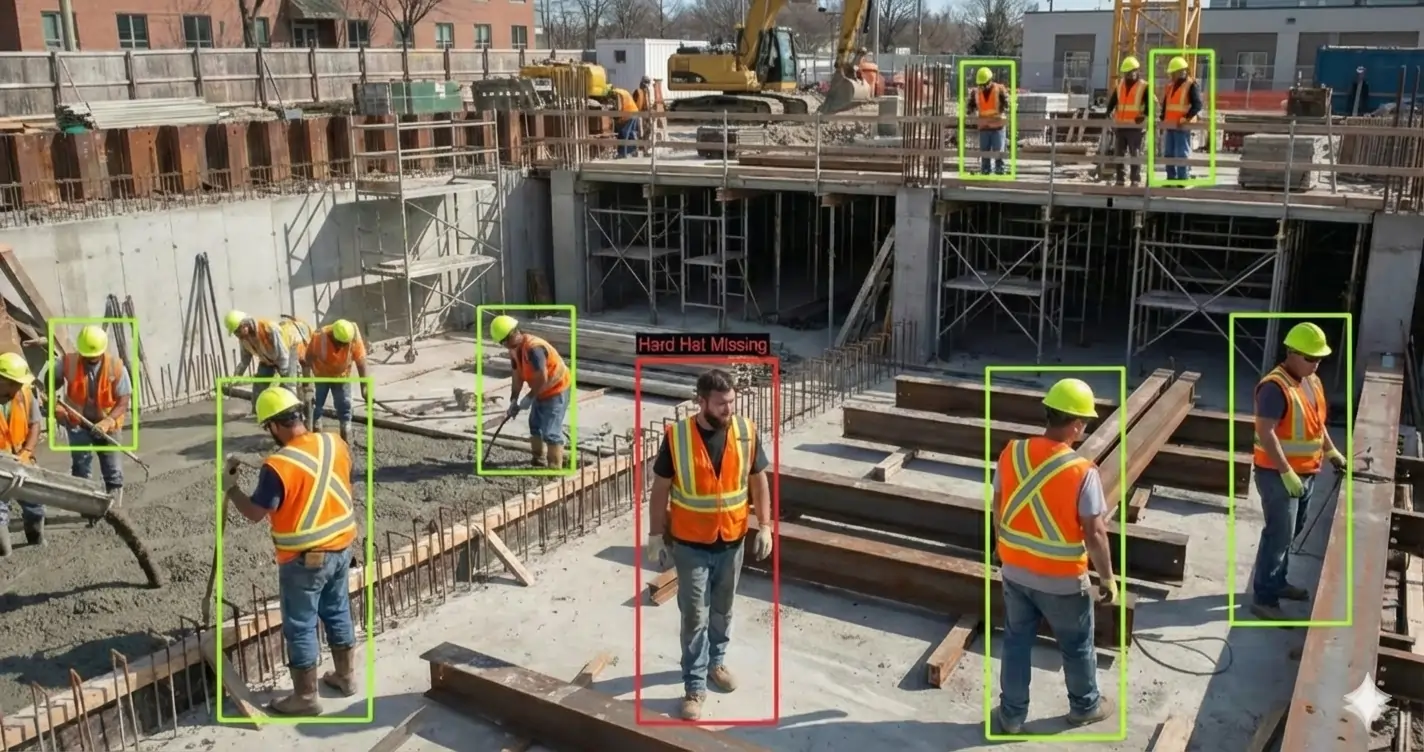
PPE Detection
Continuously monitors workers across your facility and instantly identifies when required protective equipment is missing. Detects hard hats, reflective safety vests, and protective suits in real-time.
Configuration Options:
Sensitivity Adjustment: Fine-tune detection threshold based on your environment
PPE Type Selection: Choose which equipment to monitor independently
Visualization Modes: Display presence, absence, or both on video overlay
Detection Zones: Set regions of interest for focused monitoring
Alert Thresholds: Configure confidence levels before triggering notifications
Time-Based Rules: Different requirements for shifts or operational hours
Key Capabilities
Multi-PPE Detection: Simultaneously monitors helmets, safety vests, and protective suits
Smart Alerting: Single alert per person reduces operator fatigue
Zone-Based Monitoring: Define specific areas where PPE is required
Line Crossing Detection: Trigger alerts when workers enter protected zones without equipment
Real-Time Overlays: Visual indicators show detected PPE status on live video
Configuration Options
Sensitivity Adjustment: Fine-tune detection threshold based on your environment
PPE Type Selection: Choose which equipment to monitor independently
Visualization Modes: Display presence, absence, or both on video overlay
Detection Zones: Set regions of interest for focused monitoring
Alert Thresholds: Configure confidence levels before triggering notifications
Time-Based Rules: Different requirements for shifts or operational hours
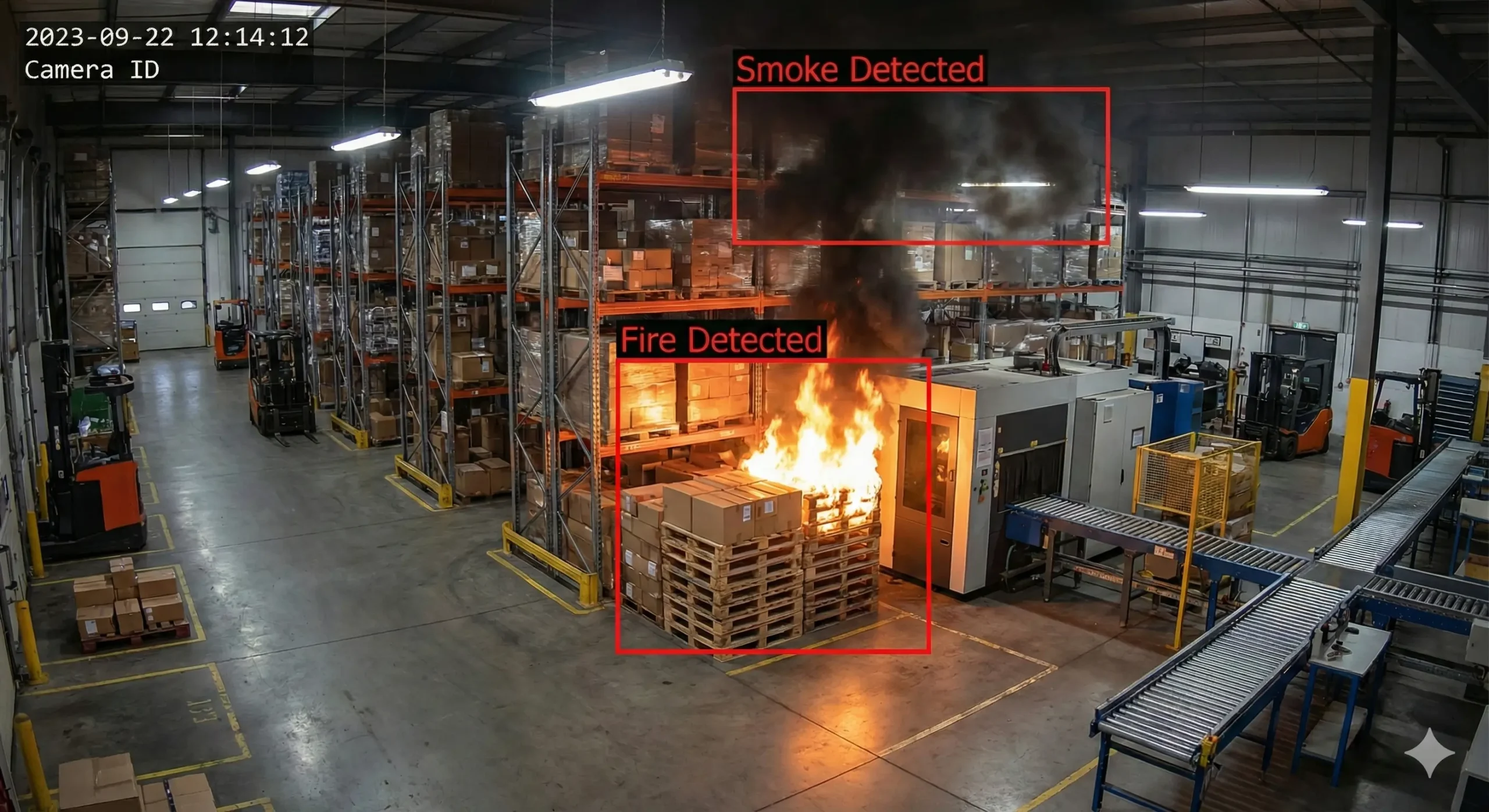
Fire & Smoke Detection
Identifies fire and smoke hazards in real-time using advanced deep learning algorithms. Detects flames, reflected fire light, smoke clouds, and ambient smoke across indoor and outdoor environments.
Key Capabilities:
Flame Detection: Identifies active fire in various lighting conditions
Smoke Recognition: Detects smoke clouds and ambient smoke particles
Reflected Light Analysis: Spots fire through reflected glow on surfaces
Multi-Zone Monitoring: Different sensitivity for different risk areas
Key Capabilities
Flame Detection: Identifies active fire in various lighting conditions
Smoke Recognition: Detects smoke clouds and ambient smoke particles
Reflected Light Analysis: Spots fire through reflected glow on surfaces
Multi-Zone Monitoring: Different sensitivity for different risk areas
Configuration Options
Sensitivity Controls: Separate thresholds for fire and smoke detection
Detection Visualization: Real-time overlays showing hazard locations
Minimum Detection Duration: Set how long hazard must be visible before alerting
Zone Management: Create inclusion/exclusion areas for focused monitoring
Alert Prioritization: Configure severity levels for different detection types
Environmental Tuning: Adjust for normal conditions (industrial steam, dust)
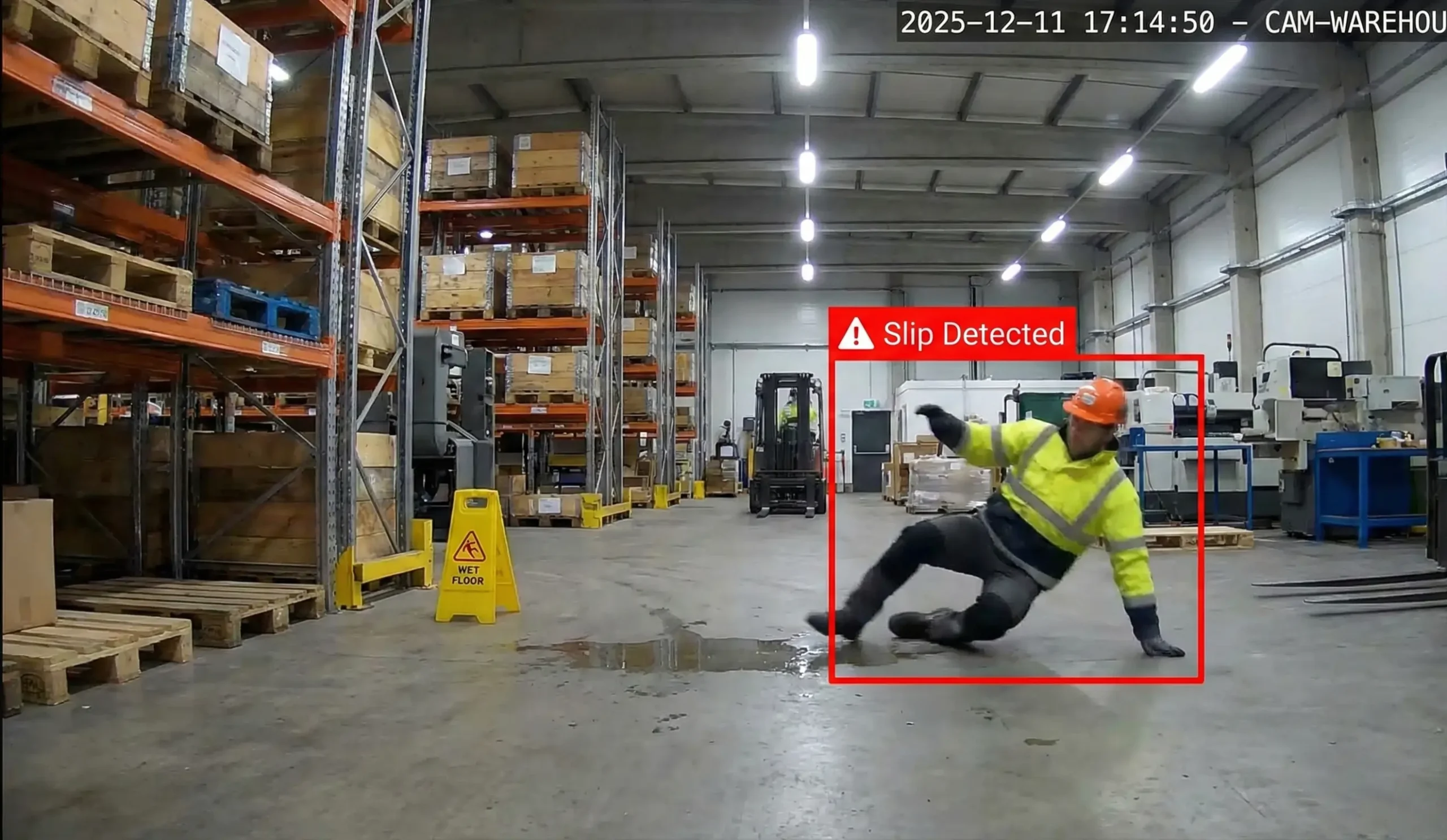
Slip & Fall Detection
Detects slip and fall incidents as they happen, enabling immediate response and reducing time-to-assistance for injured personnel.
Key Capabilities:
Real-Time Detection: Immediate identification of fall events
Pattern Recognition: Differentiates falls from intentional movements
Incident Documentation: Automatic recording of fall events
Location Tracking: Pinpoints exact camera and zone of incident
Response Coordination: Routes alerts to appropriate personnel
Key Capabilities
Real-Time Detection: Immediate identification of fall events
Pattern Recognition: Differentiates falls from intentional movements
Incident Documentation: Automatic recording of fall events
Location Tracking: Pinpoints exact camera and zone of incident
Response Coordination: Routes alerts to appropriate personnel
Configuration Options
Detection Sensitivity: Adjust threshold for fall event classification
Time Delay Buffer: Set grace period to reduce false positives
Coverage Areas: Define high-risk zones for focused monitoring
Alert Routing: Configure notification recipients by zone or severity
Recording Duration: Set pre/post-event recording length
Vigil vs. Traditional Monitoring
Capability
Real-time detection
Coverage
PPE compliance
Fire/smoke detection
False alarms
Accuracy
Scalability
Night operation
Response time
Manual Monitoring
Limited by staff availability
Spot checks only
Manual inspection
Visual observation
High
Variable
Limited by personnel
Requires staff
Minutes to hours
Traditional CCTV
Recording only
Review after incident
No detection
No detection
N/A
N/A
Limited by storage
Records only
After incident review
Instant AI detection
Continuous monitoring
Automated detection
AI-powered alerts
70% reduction
95%+
Unlimited scaling
24/7 AI monitoring
Instant alerts
Why Choose Us
Why Choose Obzerve Vigil?
We don’t just deliver AI — we deliver confidence.
Real-Time AI Monitoring
AI-powered real-time video analysis that instantly detects unusual activities and generates actionable alerts without manual monitoring.
Faster Incident Response
Intelligent Threat Detection
Scalable & Hardware-Friendly
Data-Driven Security Insights
24/7 Automated Surveillance
Success Stories in Smart Office Space
Explore Milesight's Smart Green Building: Saving $45,000 per Year
- Up to 45% On Energy Savings Per Year
- Employee Satisfaction Increased By 83%
- Increased Meeting Room Occupancy Rates By 62% Daily
Create a Smart Space with IoT-based Energy ManagementSystem (EMS) in Malaysia
- Enhanced Occupant Comfort
- Improved Indoor Air Quality
- Energy Efficiency
- Data-Driven Decision Making
Milesight Drives Digital Transformation Initiatives to Smart Offices in Malaysia's Port
- Increased Flexibility of Workspace and Scheduling
- Better and More Friendly Indoor Ambience
- Improved Energy-saving and Cost Efficiency
Deliver Smart Office Solutions to Improve Occupancy Monitoring and Vacancy Detection
- Easy Onboarding of Devices
- Scalable and Resilient to Change Infrastructure
- Improved Cleaning Tours Plan
- Improved Satisfaction of Visitors and Employees
Energy Consumption for Lighting Decreased by 25% with IoT Smart Office Solution
- 25% Improvement in Lighting Efficiency
- 11,000 Hours of Lighting Use Saved Each Month
- $3,000 Annual Savings on Electricity Bills
Ready to Upgrade Your Security?
Experience the power of real-time AI video intelligence with Obzerve.
Ready to Upgrade Your Security?
Join Our Mission to Revolutionize Surveillance with AI
Experience the power of real-time AI video intelligence with Obzerve.

- Ask us
Frequently Asked Questions
Browse through our FAQs for clear, concise answers to your most pressing questions.
Does Vigil work with my existing cameras?
Yes. For edge deployment, your cameras need AI processing capability. For near-edge deployment, any IP camera with standard video streaming (RTSP, HTTP, ONVIF) works with our Edge Box. Contact us to verify compatibility with your specific setup.
What's the difference between edge and near-edge deployment?
Edge runs directly on AI-capable cameras. Near-edge uses our Edge Box connected to any standard IP cameras—the box handles all AI processing locally. Both keep your data on-premises.
What types of PPE can Vigil detect?
Vigil detects hard hats/helmets, reflective safety vests, and protective overall suits. You can enable detection for all three or choose specific items based on your safety requirements.
Can I set different PPE requirements for different zones?
Yes. Using Region of Interest (ROI) tools, you can define specific areas where certain PPE is required—like helmets in construction zones but not in office areas.
How does Vigil's fire detection compare to traditional smoke detectors?
Vigil complements, not replaces, traditional fire safety systems. It provides visual detection across the entire camera view and can identify fire/smoke from a distance—particularly valuable in large open spaces, outdoor areas, and locations where traditional detectors are impractical.
Can Vigil distinguish between smoke, steam, fog, and dust?
Yes. Vigil uses advanced algorithms to differentiate actual fire/smoke from industrial steam, fog, dust clouds, and vehicle exhaust. You can also fine-tune sensitivity and create exclusion zones for areas with regular steam or dust.
What happens to my video data? Is it sent to the cloud?
No. All video processing happens locally—either on the camera or Edge Box. Only detection events and metadata (alerts, timestamps) are sent to your VMS. No video footage leaves your network unless you specifically configure it to.
How do I reduce false alarms?
Vigil includes multiple tuning options: adjust sensitivity thresholds (0-100 scale), set minimum detection duration, create exclusion zones, configure confidence requirements, and use line crossing for entry/exit monitoring. Our technical team assists with optimization during deployment.
Can multiple detection types run on the same camera simultaneously?
Yes. One camera can run PPE detection, fire & smoke detection, and slip & fall detection at the same time without performance degradation.
What happens if my network goes down?
Detection continues operating locally. Alerts are queued and synchronized when connectivity is restored. Detection doesn’t depend on cloud or internet connectivity.
Does Vigil work at night or in low-light conditions?
Yes, as long as your cameras provide adequate visibility. Cameras with IR illumination or good low-light sensors work well. Detection accuracy matches video quality—if a human can see it clearly, Vigil can detect it.
How accurate is Vigil's detection?
Vigil maintains 95%+ detection accuracy for PPE compliance in properly configured environments with adequate lighting and camera positioning. We achieve 70% false alarm reduction vs. traditional systems.
What's the minimum size an object needs to be for detection?
Objects must occupy at least 100×100 pixels in the camera’s field of view for reliable detection. Proper camera positioning ensures adequate resolution in monitored areas.
Can I monitor only specific areas within a camera's view?
Yes. Region of Interest (ROI) tools let you define inclusion zones (where to monitor) and exclusion zones (areas to ignore). Create multiple zones per camera with different detection rules.
Do I need to replace my existing Video Management System (VMS)?
No. Vigil integrates seamlessly with existing VMS platforms including Genetec Security Center, Axis Camera Station, Milestone XProtect, and others via standard protocols (ONVIF, webhooks, APIs).
Can I get mobile alerts when I'm off-site?
Yes, if your VMS supports mobile notifications. Vigil sends events to your VMS, which handles alert routing—including mobile push, SMS, or email based on your configuration.
Can I generate reports on safety compliance and incidents?
Yes. Vigil logs all events with timestamps, camera locations, and event types. Generate reports showing PPE compliance rates, fire/smoke alerts, slip/fall incidents, trend analysis, and violation patterns.
How long does deployment take?
Edge deployment takes 15-30 minutes per camera. Near-edge deployment takes 1-2 days for initial setup. Full site deployments typically complete within 1-2 weeks.
Can I try Vigil before committing to a full deployment?
Yes. We offer 90-day pilot programs starting with 5-10 cameras, including full feature access, hardware (for near-edge), installation support, and training.
How is Vigil priced?
Vigil is licensed per camera/stream with perpetual or subscription options. All three detection types are included. Volume discounts apply for 10+ cameras. For near-edge, Edge Box hardware is included in package pricing.
Can I start small and expand later?
Absolutely. Many customers start with a pilot of 5-10 cameras, validate performance, then expand. Licenses can be added anytime with volume discounts applied retroactively.
Do I need to buy new cameras?
Not for near-edge deployment—Vigil works with existing IP cameras. For edge deployment, you only need new cameras if yours lack AI processing capability. You can mix deployment types as needed.